Intro to SQL

Annye Driscoll | annyedriscoll.com
Welcome!
Girl Develop It is here to provide affordable and accessible programs to learn software through mentorship and hands-on instruction.
Some rules
- We are here for you!
- Every question is important
- Help each other
- Have fun
Tell us about yourself
- What's your name?
- What's your experience level with SQL?
- What do you hope to get out of the class?
- What is your favorite movie and how many times have you watched it?
We're going to make a table out of this info in part 2!
About me
- Full-stack developer
- SQL education is from the "field"
- Favorite movie is Return of the King, watched 20 times.
What to expect from the class
- This is a complement to the database design class.
- We'll be using the same terminology and building on those concepts...
- ...but we'll be hands-on!

By the end of the class, you will be able to query and modify a SQL table to make sense of the data you have.
Plan for the day: CRUD
Pre-break: cRud
-
What's a database? What's SQL?
- How to query a database:
- Select statement (from statement)
- Select, Distinct
- Count
- Group By, Order By
- Clauses
- Where
- Like
- Joins (Inner/Outer Left/Right)
- Practice
Post-break: CrUD
- Subqueries
- Practice
- How to modify a database
- Creating a table
- Updating a table with rows
- Deleting rows vs. deleting tables
- Optimizing queries
- Resources and links
- Practice
What is a database?
A set of related data and the way it is organized!
What is a database?
A collection of tables, schemas, queries, reports, views, and other objects (it’s not just tables of data!) often organized in a way that supports processes or reflects real life in order to facilitate business or functions.
What is a database - what are those things?!
A collection of tables, schemas, queries, views…
- Table = collection of related data arranged in columns and rows.
- Schema = logical grouping of objects (tables, etc.), often in a functional way.
- Query = request for information from a database.
- View = result of a stored query.
Our database model of choice
Relational database = organizes data into one or more tables of columns and rows with a unique key identifying each row (record).
The language of relational databases
- Database keys (primary and foreign): The pointers in each table that can link to other tables
- Indexes: Make databases easier to search
- Queries: How to ask questions of the tables and databases
Primary and Foreign Keys
Tables are joined on special fields called keys
- Primary Key (PK)
- A field (or set of fields) that uniquely identify a row
- Foreign Reference Key (FK)
- A field (or set of fields) that is a PK in some other table
- There can be multiple FK in a table
- Points to a row in another table
What's SQL?
- SELECT user_name, SUM(total_purchases)
- FROM billing_database.user_table
- WHERE user_name LIKE 'Henderson%'
- AND billing_month = 'January'
- GROUP BY user_name;
- SQL is the language that the database speaks to get data, modify data, and modify the database.
- SQL has a lot of words similar to English, but they have their own meaning as keywords.
- Like Siri or Alexa
Different Flavors of SQL
- How do you say that you want a can of Coca-Cola?
- Coke, soda or pop?
- How do you write SQL?
| Oracle | MySQL |
| SQL Server | Postgres |
| Access | Sybase |
| DB2 |
All different flavors of the same language
A multi-functional language
- Reading tables you or other people wrote
- Modifying those tables to add your own information and/or creating your own tables and data
Databases and CRUD
- Create INSERT, CREATE
- Adding rows to your table or tables to your database
- Read SELECT
- Picking specific information from your table
- Update UPDATE, ALTER
- Changing specific information in your table or your database
- Delete DELETE, DROP, TRUNCATE
- Erase your data or your tables
Plan for the day: CRUD
Pre-break: cRud
-
What's a database? What's SQL?
- How to query a database:
- Select statement (from statement)
- Select, Distinct
- Count
- Group By, Order By
- Clauses
- Where
- Like
- Joins (Inner/Outer Left/Right)
- Practice
Post-break: CrUD
- Subqueries
- Practice
- How to modify a database
- Creating a table
- Updating a table with rows
- Deleting rows vs. deleting tables
- Optimizing queries
- Resources and links
- Practice
What can you do with SQL - Reading!
The power is in the relationship between data sets.
- How many customers do we have in Los Angeles?
- What's a certain person's Facebook and Twitter handle?
- Did profits go up or down this quarter?
- How many users are clicking on our new site?
SQL clauses: required order
| 1 SELECT | selects variables |
| 2 FROM | opens datasets |
| 3 WHERE | restricts observations |
| 4 GROUP BY | groups observations |
| 5 HAVING | restricts groups |
| 6 ORDER BY | sorts results |
Let's develop it!
Let's get started reading tables
We'll use MySQL, a popular version of SQL.
If you've done anything online, chances are the transation went through MySQL (Walmart, Kayak, Facebook, Etsy, Verizon).
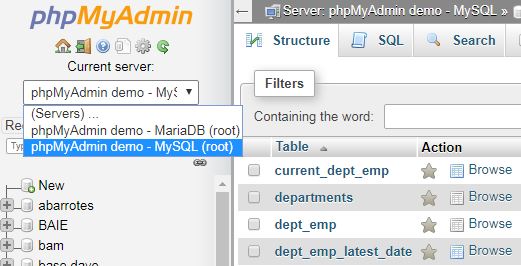
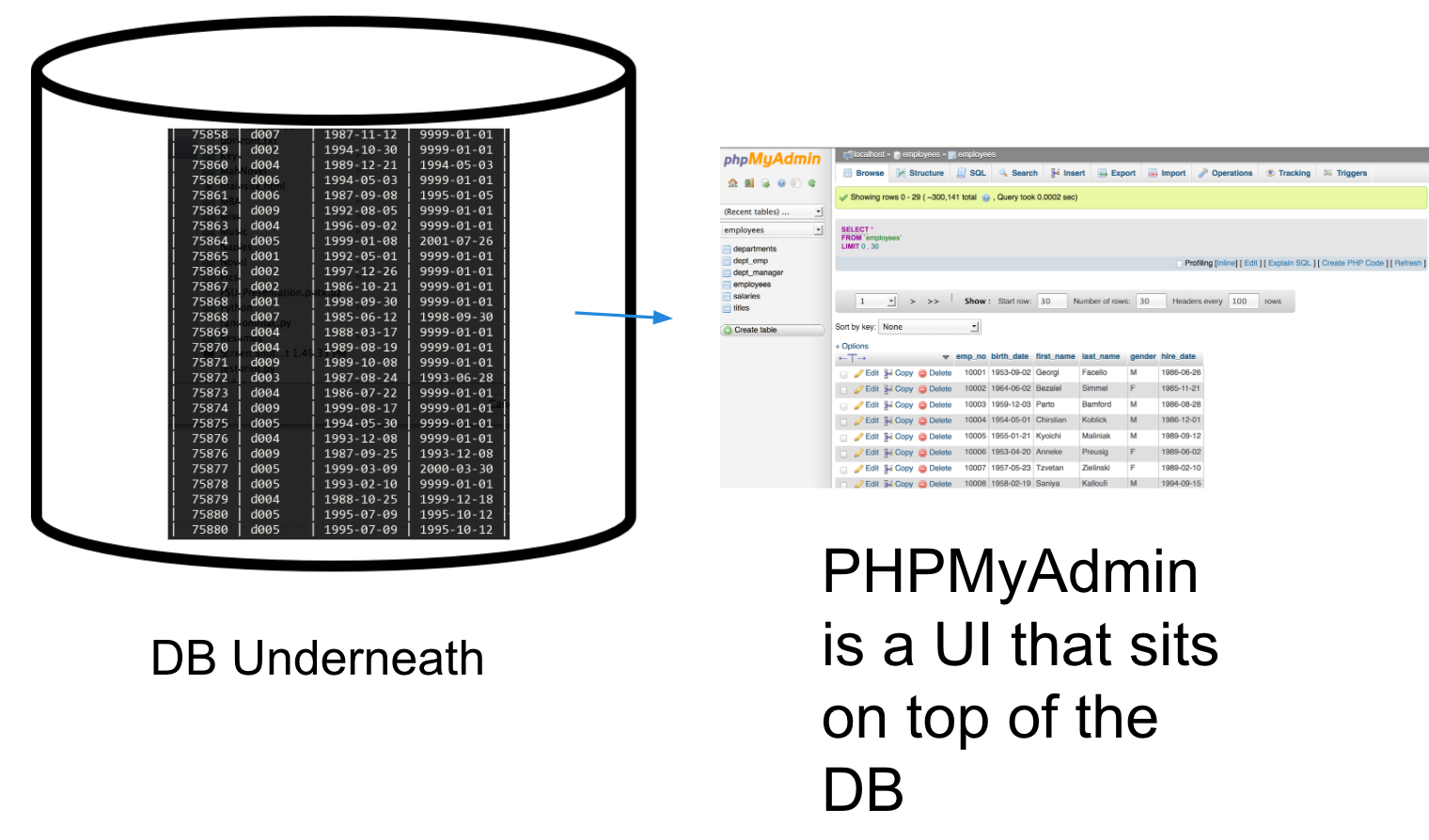
We'll log on to the front-end of MySQL, PHPMyAdmin.
Logon site: https://demo.phpmyadmin.net/STABLE/
Login username is "root". Leave the password field blank.
Once you're in, make sure you're in the MySQL demo:
How PHPMyAdmin Works
We have test data we can learn with!
Already loaded are a bunch of employee records we'll be using together.
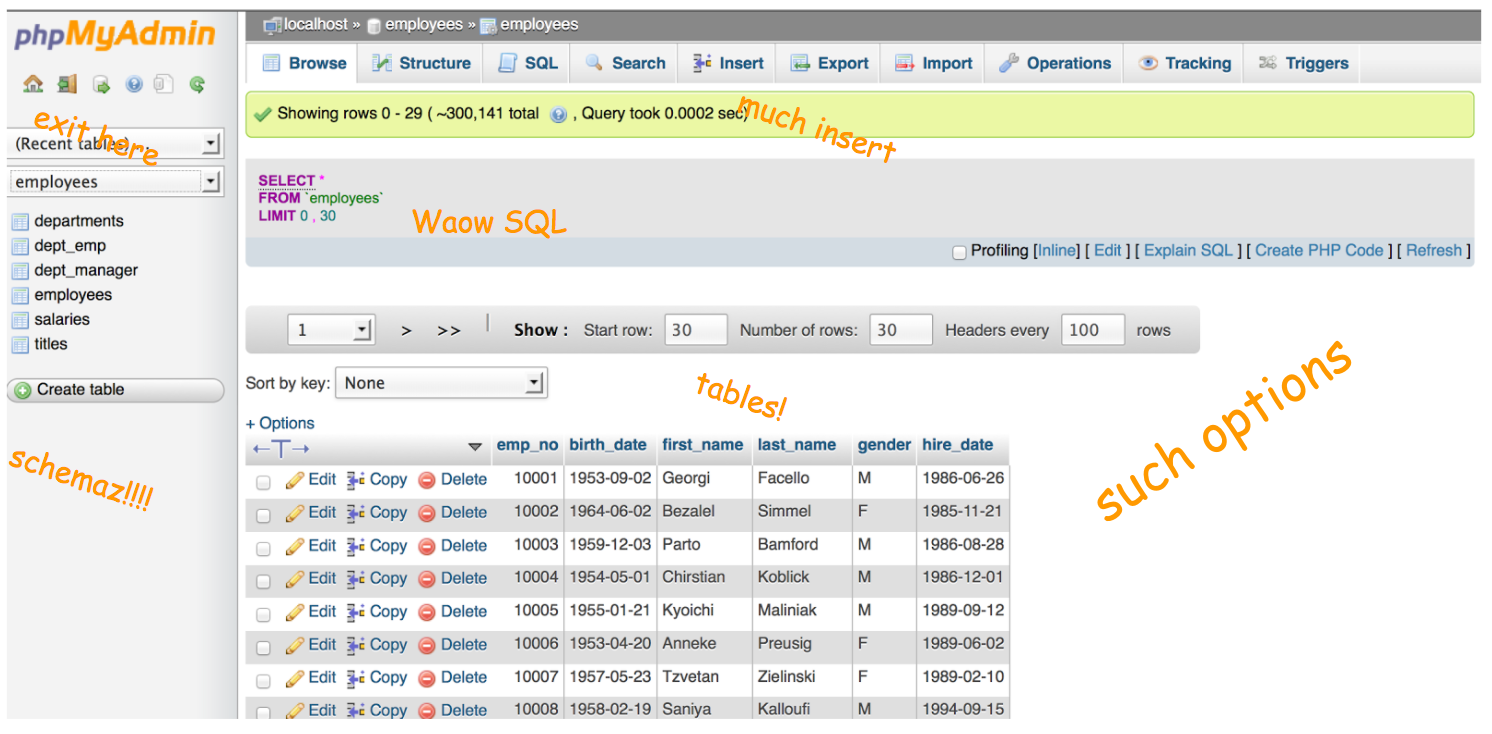
Employee data:
6 tables in the employees schema
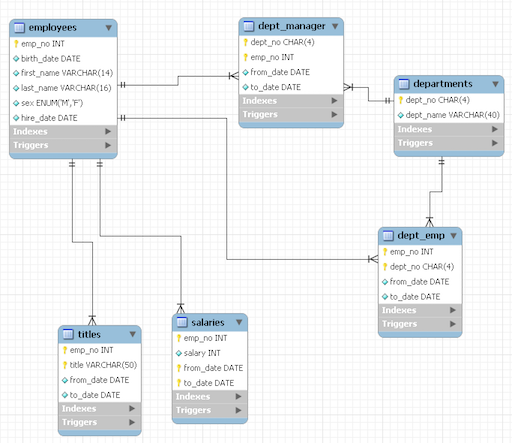
Data Source
Tables and Schemas
employees is the database and it has 6 tables.
Database → Schema → Table
Book → Chapter → Page
MySQL Database → Employees Schema → employees Table
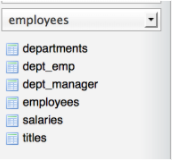
How to access specific tables
- Database: employees
- Tables:
- employees.employees,
- employees.departments,
- employees.salaries
- And so on.
Usually it's bad practice to name tables the same thing as the database (confusing), but we'll be ok with the small test data set.
Let's develop it!
Let's run our first query!
Go to the SQL tab and type in:
SELECT * FROM employees.employees; 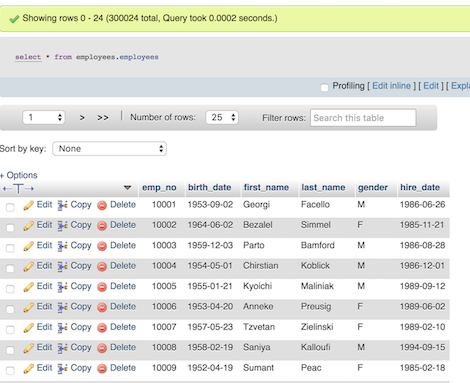
Type out all the SQL you write. It'll be easier to learn.
SELECT * from different tables
Try a couple of these:
SELECT * FROM employees.titles;
SELECT * FROM employees.dept_emp;
SELECT * FROM employees.salaries;
and check out the tables and info.
Stretch break!

Selecting specific columns
Now let's try selecting only certain columns
SELECT title, emp_no FROM employees.titles; A note about the semi-colon: depending on which flavor of SQL you're using you may not need it, but it's good practice in general to include it.
More specific columns. Let's get to know our data.
Selecting one column:
SELECT dept_name FROM employees.departments;Selecting multiple columns:
SELECT emp_no, dept_no FROM employees.dept_emp;SQL has built-in functions!
- The MIN() function returns the smallest value of the selected column.
- The MAX() function returns the largest value of the selected column.
- The COUNT() function returns the number of rows that matches a specified criteria.
- The AVG() function returns the average value of a numeric column.
- The SUM() function returns the total sum of a numeric column.
Trying out some built-in functions
SELECT AVG(salary) FROM employees.salaries;SELECT MIN(from_date) FROM employees.dept_manager;Distinct: selecting only unique instances of that column.
SELECT DISTINCT title FROM employees.titles;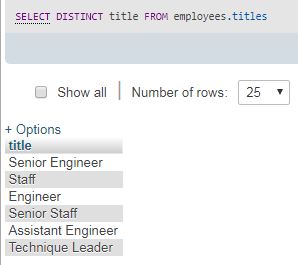
Difference between distinct and *
SELECT COUNT(DISTINCT title) FROM employees.titles;
6
SELECT COUNT(title) FROM employees.titles;
14,782
Difference between distinct and *
Distinct: Selecting only unique instances
Which result set is bigger?
What is each one telling us?
SELECT COUNT(title) FROM employees.titles;
14,782
SELECT COUNT(*) FROM employees.salaries;
94,917
Which table is the largest?
SELECT COUNT(*) from employees.departments;
9
SELECT COUNT(*) FROM employees.dept_emp;
11,050SELECT COUNT(*) FROM employees.dept_manager;
24SELECT COUNT(*) FROM employees.employees;
10,000SELECT COUNT(*) FROM employees.salaries;
94,917SELECT COUNT(*) FROM employees.titles;
14,782SQL clauses: required order
| 1 SELECT | selects variables |
| 2 FROM | opens datasets |
| 3 WHERE | restricts observations |
| 4 GROUP BY | groups observations |
| 5 HAVING | restricts groups |
| 6 ORDER BY | sorts results |
Now let's group stuff!
                        SELECT type_of_dog,COUNT(*)
                        FROM animals.total_dogs
                        GROUP BY type_of_dog;
Group statements corral data together into categories when we want to count things by groups of things
i.e. How many total dogs vs puppies vs parents.

Counting titles and salaries
What is this telling us? How many instances of that title are there in the table?SELECT title, COUNT(*) FROM employees.titles
GROUP by title;
More group by examples
SELECT dept_name, COUNT(*) FROM employees.departments
GROUP BY dept_name;
Group by more than one item:
SELECT first_name, COUNT(*)
FROM employees.employees
GROUP BY first_name
SELECT first_name, last_name, COUNT(*)
FROM employees.employees
GROUP BY first_name, last_nameLet's try some exercises that combine COUNT(*), DISTINCT and GROUP BY
How many unique salaries does each employee have? (how many times have they been given raises?)
SELECT emp_no, COUNT(DISTINCT salary)
FROM employees.salaries
GROUP BY emp_no;
How many managers has each department had?
SELECT dept_no, COUNT(emp_no)
FROM employees.dept_manager
GROUP BY dept_no;
How many people that were born on the same day, have the same first name?
SELECT birth_date,first_name, COUNT(*)
FROM employees.employees
GROUP BY birth_date, first_name;
Another kind of group-by:
maximum and minimum
Which title has been around the longest?(Smallest employee number)
SELECT title, MIN(emp_no)
FROM employees.titles
GROUP BY title;
Order by: Sorts by the terms you want
Will sort by ascending by default.
SELECT first_name, gender, COUNT(*)
FROM employees.employees
GROUP BY first_name, gender
ORDER BY first_name;

SELECT first_name, gender, COUNT(*)
FROM employees.employees
GROUP BY first_name, gender
ORDER by first_name DESC;
Ordering by more than one column, will sort by the first, then by the second, ascending
SELECT gender, birth_date FROM employees.employees
ORDER BY gender, birth_date;
Order by exercises
Order by a number ascending
SELECT emp_no, salary FROM employees.salaries
ORDER BY salary ASC;
Order by a number descending
SELECT emp_no, salary FROM employees.salaries
ORDER BY salary DESC;
SQL clauses: required order
| 1 SELECT | selects variables |
| 2 FROM | opens datasets |
| 3 WHERE | restricts observations |
| 4 GROUP BY | groups observations |
| 5 HAVING | restricts groups |
| 6 ORDER BY | sorts results |
Where Clause: Like a Filter
You only want to select certain things.
SELECT first_name, last_name
FROM employees.employees
WHERE first_name='Adam';
The LIKE operator
"Like" is used in a WHERE clause to search for a specific pattern.
SELECT last_name, COUNT( * )
FROM employees.employees
WHERE last_name LIKE 'S%' -- begins with 'S'
GROUP BY last_name;- What happens when you do last_name = 'S%'?
- What happens when you do last_name LIKE '%S%'?
- What's the difference between LIKE and =?
Not restricted to = and LIKE in WHERE clauses:
- <> or != : Not equal
- > : Greater than
- < : Less than
- BETWEEN : Between a certain range
WHERE column_name BETWEEN value1 AND value2;WHERE column_name IN (value1, value2, ...);Not restricted to one condition:
- AND: Pulls a record if all the conditions separated by AND are TRUE
WHERE condition1 AND condition2 AND condition3 ...;WHERE condition1 OR condition2 OR condition3 ...;Where clause exercises
All people named Mary or Elvis:
SELECT * FROM employees.employees
WHERE first_name IN ('Mary', 'Elvis');
SELECT * FROM employees.employees
WHERE first_name = 'Mary' OR first_name = 'Elvis';All of the engineers before 2000:
SELECT * FROM employees.titles
WHERE title LIKE '%Engineer%' AND from_date < '2000-01-01';
Break!
Cooking with the good suff: joins
One table is great, but the power of SQL comes from being able to join related tables to get information.

Plan for the day: CRUD
Pre-break: cRud
-
What's a database? What's SQL?
- How to query a database:
- Select statement (from statement)
- Select, Distinct
- Count
- Group By, Order By
- Clauses
- Where
- Like
- Joins (Inner/Outer Left/Right)
- Practice
Post-break: CrUD
- Subqueries
- Practice
- How to modify a database
- Creating a table
- Updating a table with rows
- Deleting rows vs. deleting tables
- Optimizing queries
- Resources and links
- Practice
Primary and Foreign Keys
Tables are joined on special fields called keys
- Primary Key (PK)
- A field (or set of fields) that uniquely identify a row
- Foreign Reference Key (FK)
- A field (or set of fields) that is a PK in some other table
- There can be multiple FK in a table
- Points to a row in another table
Using keys to connect tables
emp_no is the column that's the primary key for all three tables that allows us to join them

We join primary keys to foreign keys!
How all the tables join in our schema
In SQL, a join looks like this:
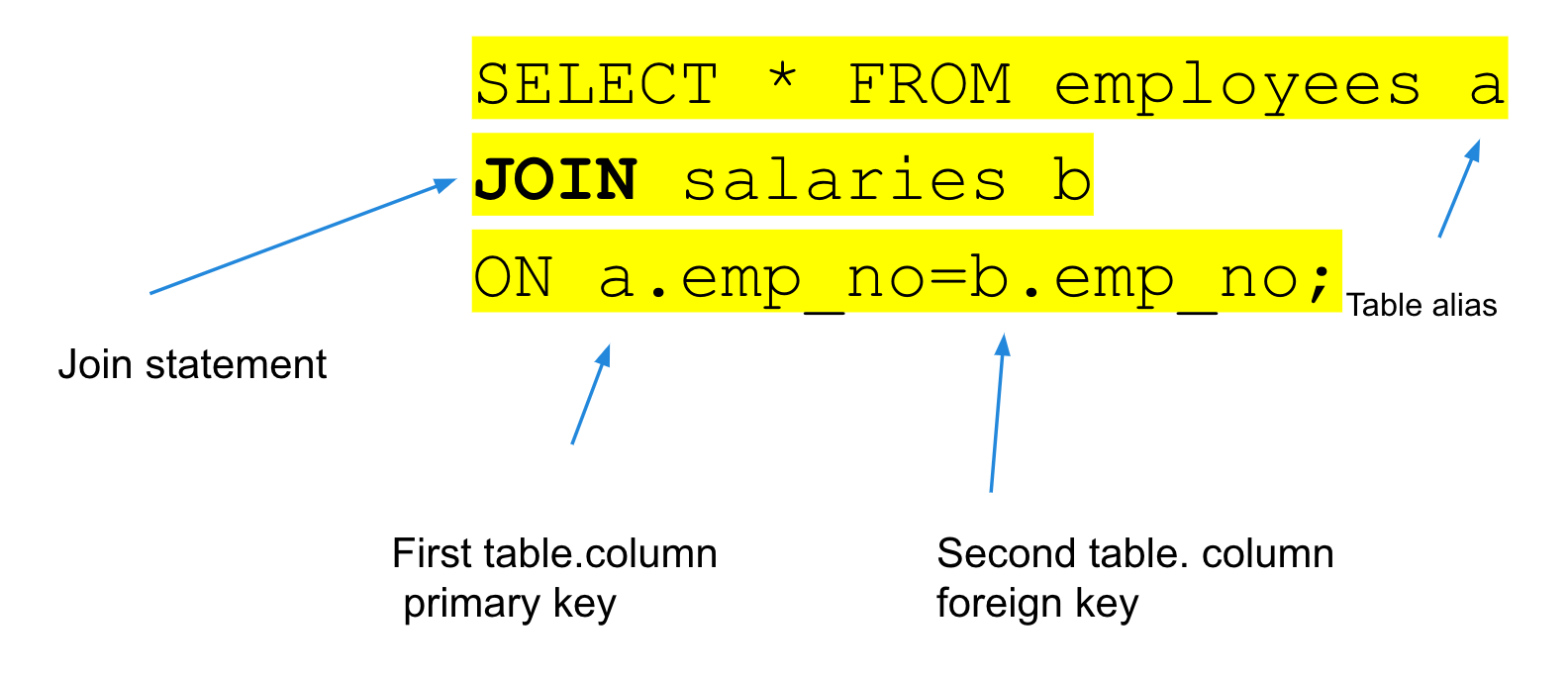
Often when we join tables, we make them easier to reference later on by aliasing them, but at this point it's a style choice.
You can now select columns that, before, only existed in either table
Find out salary history:
SELECT first_name, last_name, hire_date,salary, from_date, to_date
FROM employees.employees a
JOIN employees.salaries b ON a.emp_no = b.emp_no| first_name | last_name | hire_date | salary | from_date | to_date |
|---|---|---|---|---|---|
| Georgi | Facello | 6/26/86 | 60117 | 6/26/86 | 6/26/87 |
| Georgi | Facello | 6/26/86 | 62102 | 6/26/87 | 6/25/88 |
| Georgi | Facello | 6/26/86 | 66074 | 6/25/88 | 6/25/89 |
Another join example
When you have two columns from different tables with the same name, you have to reference them specifically with the alias.
SELECT a.first_name, a.last_name, a.hire_date, b.salary, b.from_date, b.to_date, c.title, c.from_date, c.to_date
FROM employees.employees a
JOIN employees.salaries b
ON a.emp_no = b.emp_no
JOIN employees.titles c
ON a.emp_no = c.emp_no
Different types of joins

Source
Let's develop it!
Left join example
Left join: All the fields in the first table, plus the ones that match in the second table
SELECT first_name, last_name, hire_date,title, c.from_date, c.to_date
FROM employees.employees a
LEFT JOIN employees.titles c ON a.emp_no = c.emp_no;
What if you'd done a right join instead?
Using everything we've learned
What is this query telling us?
SELECT first_name, last_name, a.emp_no, hire_date,
COUNT(DISTINCT title), COUNT(DISTINCT salary)
FROM employees.employees a
JOIN employees.salaries b ON a.emp_no = b.emp_no
JOIN employees.titles c ON a.emp_no = c.emp_no
where first_name like 'A%'
GROUP BY first_name, last_name, hire_date, a.emp_no;
Going all in again:
What is this query bring back?
SELECT first_name, last_name, hire_date, a.emp_no, salary, from_date as
salary_start_date, to_date AS salary_end_date
FROM employees.employees a
JOIN employees.salaries b ON a.emp_no = b.emp_no
WHERE salary > 60000
AND from_date > '2000-01-01'
ORDER BY last_name
(Longer) Break!
Now the power of subqueries

Using nested logic datasets to query other data sets
Subqueries
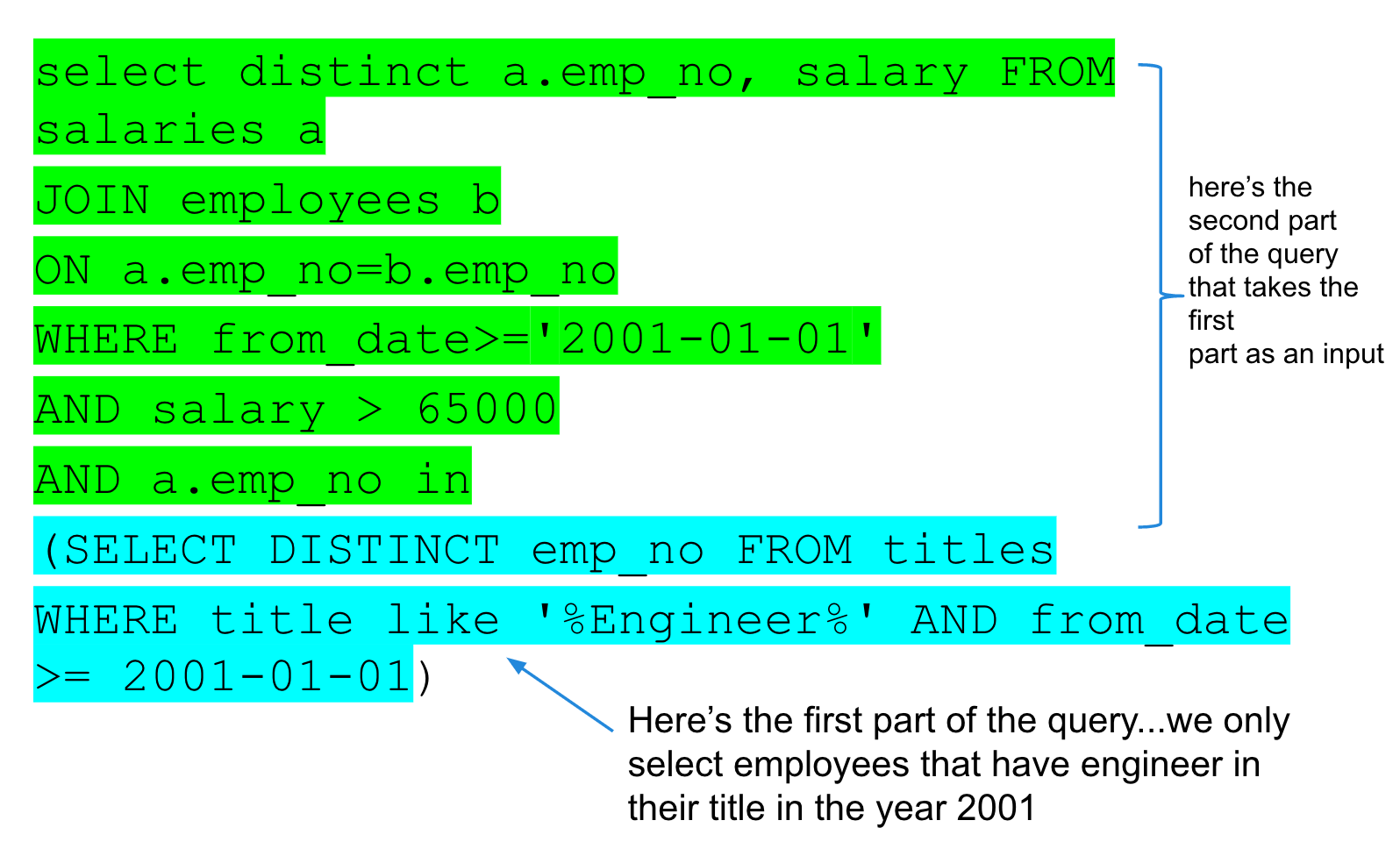
A subquery (or inner query or nested query) is a query within a query. Most of the time, a subquery is used when you know how to search
for a value using a SELECT statement, but not the exact value

Subqueries: How much money did only the engineers make?
What kind of business questions can we answer now? SQL Power!
Exercises:
- How many employees do we have?
SELECT COUNT(DISTINCT emp_no)
FROM employees.employees;SELECT * from (
SELECT emp_no, COUNT(*) AS number_of_salaries
FROM employees.salaries
WHERE from_date BETWEEN '1996-01-01' AND '1997-01-01'
GROUP BY emp_no) a
WHERE number_of_salaries > 1SELECT title, COUNT(DISTINCT a.emp_no)
FROM employees.titles a
JOIN employees.employees b
ON a.emp_no = b.emp_no
GROUP BY titleWhat kind of business questions can we answer now? SQL Power!
Exercises:
- What's the top salary by department?
- How much money did non-engineers make?
Rehash
What did we do so far?
- What a database is
- What a table is
- Why relationships are good
- How to query a table or database with SQL
- How to read a SQL query
- How to ask business questions with SQL
We learned cRud; now we learn CrUD
Now that you see how powerful SQL is, let's make some tables of our own. What if we have tons of data we want to query?
With great power comes great responsibility
You have the ability to create tables, but also to delete them by accident, to create duplicate data, or to confuse people with data.
You have great power. Use it wisely :)
First we create our database
CREATE DATABASE annyeName it with your first name or something easy you can remember. You'll have to keep typing it, so under 10 characters is optimal.
And you should see it show up!
Things to think about when designing relational tables

- How will you join to other tables?
- What kind of data are you storing?
- Who else will use your tables?
Storing data as relations
- eliminates redundancy
- saves space
- reduces mistakes
Data Types
- Numbers
- Boolean: True or False [0,1]
- Int/TinyInt: whole numbers, negatives [5, -7]
- Decimal: [.5555, 2.40404040]
- Strings
- Varchar(can't add/subtract):[Belle, five, 5]
- Have to specify length
- Blob: [9999349234023403204300000]
- Dates/Times
- Date: 2013-01-01, 9/1/2012]
- Timestamp(UTC) [1385496316]
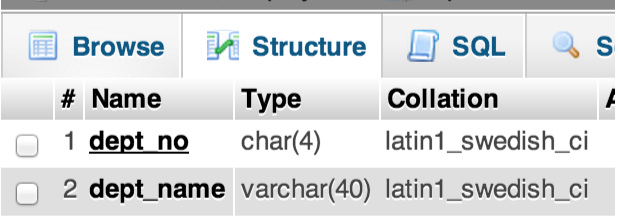
Let's look at the data types in the tables we have
By going to STRUCTURE
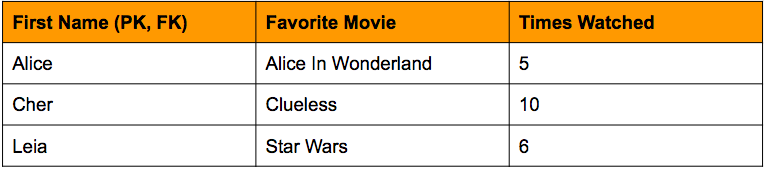
What would the ideal database for our favorite movies look like?
- What tables would we want?
- What would we name the columns?
- Which ones will be the primary and foreign keys?
Our (very simple) movie database
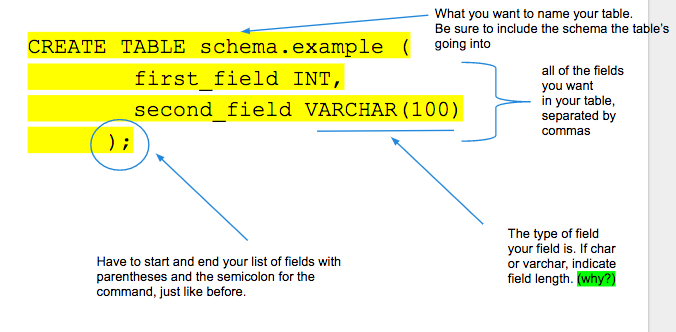
How to create a table with SQL
Run in the same place you did your select statements:
Here's the create statement for one of the tables we've been working with
CREATE TABLE employees (
emp_no      INT             NOT NULL,
first_name  VARCHAR(14)     NOT NULL,
last_name   VARCHAR(16)     NOT NULL,
gender      ENUM ('M','F')  NOT NULL,
hire_date   DATE            NOT NULL,
PRIMARY KEY (emp_no);
Which field is the primary key?
Which fields are numbers?
What's an enum*?
What's meant by "NOT NULL"?
Constraints specify rules for data in a table.
- NOT NULL - Ensures that a column cannot have a NULL value
- UNIQUE - Ensures that all values in a column are different
- PRIMARY KEY - A combination of a NOT NULL and UNIQUE. Uniquely identifies each row in a table
- FOREIGN KEY - Uniquely identifies a row/record in another table
- DEFAULT - Sets a default value for a column when no value is specified
- INDEX - Used to create and retrieve data from the database very quickly
Let's get to it
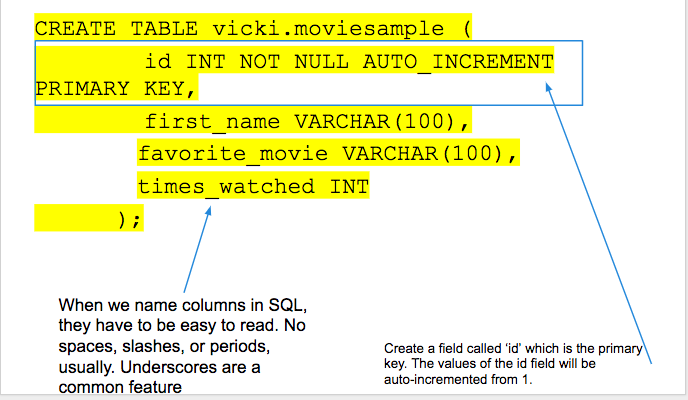
Now let's do some quick analysis
SELECT * FROM annye.moviesample;
SELECT first_name FROM annye.moviesample;
SELECT COUNT(*) FROM annye.moviesample;
What do we get?
Nothing! because our table has no data...yet
Inserting data into a SQL table
Now that we have the table set up, we can insert the values. Let's load a row of data.
INSERT INTO
yourname.tablename (first_name, favorite_movie, times_watched) -- column names
VALUES ('Jasmine', 'Aladdin', '456'); -- column values
Adding data to tables
INSERT INTO annye.moviesample(first_name, favorite_movie, times_watched)
VALUES ('Alice','Alice in Wonderland', 5);
Now let's check it...wahoo! We have rows!
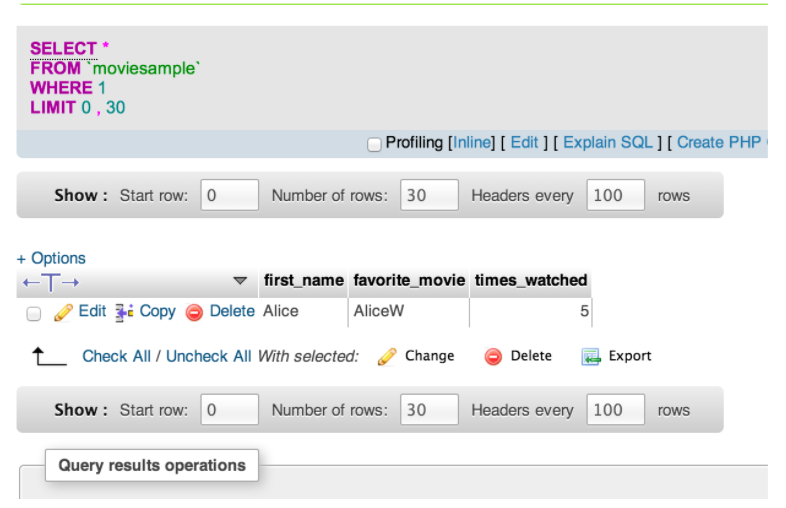
How do we add the rest of the data?
INSERT INTO annye.moviesample
(first_name, favorite_movie,times_watched)
VALUES ('Annye', 'Return of the King', '20');

INSERT INTO annye.moviesample
(first_name, favorite_movie,times_watched)
VALUES ('Jasmine', 'Aladdin','456');
Break to enter the rest of the data into the table
What kind of issues do you see arising from wrong data entry?

There are much easier ways of getting data into tables
- Bulk-loading ETL
- Writing a script in Perl, Ruby, Python, or any other scripting language
- Manipulating Excel to write your insert/update statements
Our beautiful movie table!
Let's answer some exercises with SQL:
What's the most popular movie?SELECT favorite_movie,
COUNT(DISTINCT first_name)
FROM yourname.moviesample
GROUP BY favorite_movie
ORDER BY COUNT(DISTINCT first_name) DESC;- How many times was the most someone watched a movie?
- How many movies have 'The' in the title?
- How many people watched a favorite movie more than 3 times?
Now, let's make another table
We want to see which decade was most popular among GDI members. This one will have the data for the movie name and the year it was made.
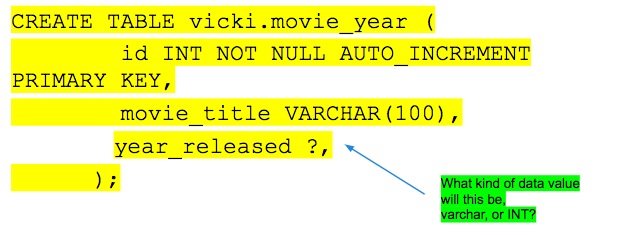
How do we add the movie year data?
INSERT INTO table_name (column1, column2, column3, ...)
VALUES (value1, value2, value3, ...);
Analyzing our tables
SELECT * FROM annye.moviesample a
JOIN annye.movie_year b
ON b.movie_title = a.favorite_movie- What happens when you have two fields with the same name in your select statement?
- What would be a better field to join on?
Deleting SQL Values
What kind of issues do you see arising from wrong data entry?
This is the part where you have to be really careful. Most users won't have access to delete tables.
- truncate table: Leaves the table structure intact, just deletes the values. (Like deleting all values in a spreadsheet, but keeping the Excel file.)
- drop table: Deletes EVERYTHING. BADBADBAD. (file goes in the trash)

Dropping Rows Example
Easy way in UI: The delete button. Be careful!

SQL can be much more accurate:
DELETE FROM annye.moviesample WHERE first_name = 'Shrek';You can delete with any type of where statement
DELETE FROM moviesample
WHERE first_name like '%S';

DELETE FROM moviesample
WHERE times_watched >= '500';
Updating the table
-
SELECTis to look at data -
CREATEis to create a table -
DELETEis to erase data or a table -
UPDATEis to change specific data entries
UPDATE annye.moviesample
SET first_name = 'Chihiro', times_watched = 3
WHERE movie = 'Spirited Away';
Try it now
Altering the Table
-
SELECTis to look at data -
CREATEis to create a table -
DELETEis to erase data or a table -
ALTERis to fundamentally change a table:
ALTER TABLE icecream DROP COLUMN flavor;
ALTER TABLE icecream ADD UNIQUE (quantity);
ALTER TABLE icecream MODIFY flavor VARCHAR(35);
Try it now:
ALTER TABLE annye.moviesample ADD COLUMN release_yr
VARCHAR(4) AFTER times_watched;
Best Practices
- Limit your queries by timerange
- Primarily join on primary keys
- Profile your data beforehand
- Save your SQL queries for future use
- Be friends with your database people
You did it!
Here's what we've learned:
- Reading tables (cRud)
- Basic SQL data types
- Basic SQL logic
- Joins
- Subqueries
- Writing tables (CrUD)
- Creating tables
- Basic deletes and updates

More SQL Resources
- W3 Schools : Great for learning or just for checking syntax - includes coding exercises on every page.
- Learn SQL The Hard Way : Comes highly recommended, and not hard at all
- Visualizing SQL Joins : Awesome blog post for simplifying joins
Practice, practice, practice! Upload your Excel spreadsheets.
- Practice data set that we used in class
Thank you!
Annye Driscoll | annye.driscoll@gmail.com